


Cozi Family Organizer
4.728.67K Reviews
App Specs
- Version
- 2026.08.09
- Updated On
- License
- Free
- Downloads
- 5,000,000+
- Developer
- Cozi Inc.
- Categories
- Productivity
- Platform
- Android, iOS
Screenshots

 Analysis by AppCompare
Ever feel like you're juggling a million tasks, and your brain is about to explode trying to keep track of everything? Welcome to my life. That's where the Cozi Family Organizer comes in. I've been giving it a whirl on my phone, and let me tell you, it's like having a personal assistant in your pocket. Let's dive into why this app might just become your new best friend.
When a shared plan depends on a connection
The main appeal of this family productivity app is that it gives several people a common place to check plans and lists. That shared setup is also where connectivity matters most: a calendar entry is only useful to another person once it has reached the place they check. I’d make a habit of opening the calendar after adding an important appointment, especially before assuming everyone else has seen a last-minute change.
For everyday coordination, the practical question is less about having every feature and more about whether everyone will use the same routine. If one person updates the calendar while the rest keep relying on scattered texts, Cozi cannot magically make the household coordinated. I’d agree on a simple rule, such as adding appointments to the shared calendar and using a list for shopping, then make the app the place to check before heading out.
Keeping It All Together
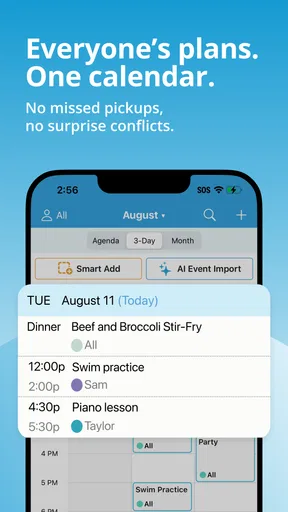
First off, the Cozi Family Organizer is all about getting your life in order. It's like a Swiss Army knife for your family’s schedule. You can create shared calendars, to-do lists, and even grocery lists. Everything is synced across devices, so no more "I forgot the milk" moments. You can thank me later.
Setting up was a breeze. You just download the app, create an account, and you're off to the races. I added my family members, which was super easy, and now we can all see what’s happening at any given time. The app’s interface is friendly and intuitive, which means even the less tech-savvy members of your family can use it without a hitch.
Features That Make Life Simpler
One of my favorite features has to be the calendar. It’s color-coded, which makes it easy to differentiate between work meetings, school events, and that soccer practice you keep forgetting. You can set reminders so you’re not scrambling at the last minute. Trust me, it’s a game-changer.
A useful habit is to add the details that make an event actionable, not just its title: who needs to be there, where the family must go, and when it starts. That way, the calendar can answer the questions people usually send in a flurry of messages before leaving home. I’d also use reminders for fixed commitments, but keep flexible chores on a list; too many alerts can become noise, and an alert is not a substitute for checking whether a plan has changed.
Worth Reading Before You Choose

EA SPORTS FC Mobile 26 Is a Bigger Football Game, but It Takes Time

Flipboard Shows What News Apps Must Do Beyond the Feed

Switching to Android Auto Means Rethinking Your Driving Routine

Google Calendar Makes a Crowded Week Easier to Manage

Ludo King Makes the Most of the Minutes Between Plans

Baby Panda World Brings Quick Play to Modern Phones, but Its Game Library Feels Busy
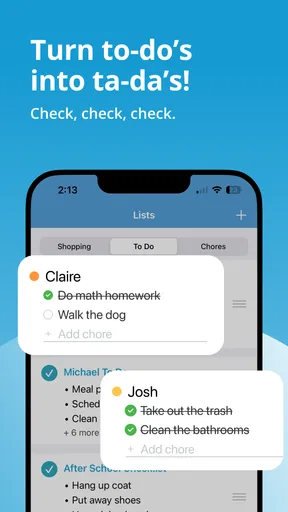
The to-do lists are another lifesaver. You can create lists for just about anything—packing for trips, weekend chores, or even holiday shopping. Plus, you can assign tasks to different family members. It's like a digital version of a chore wheel, but way cooler.
The Grocery Wizard
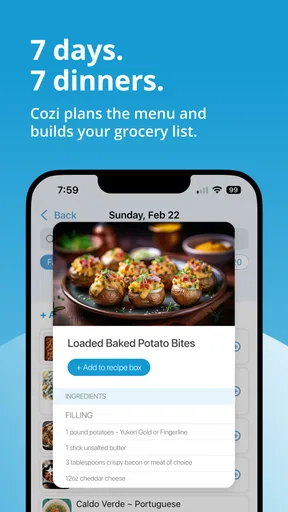
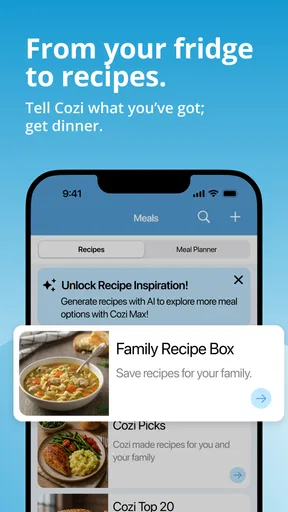
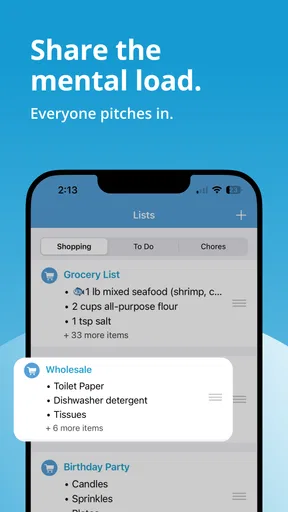
Let’s talk grocery lists for a sec. Ever been in the store and realized you left your list at home? Yeah, me too. With Cozi, your list is always with you. You can add items on the fly and check them off as you shop. The app even has a meal planner feature, so you can map out meals for the week and add ingredients directly to your shopping list. No more wandering the aisles aimlessly. Score!
One small workflow choice makes a shared shopping list much easier to trust: agree on how the household names common items. If one person writes “oat milk” and another adds a brand or size in a separate entry, the list can become harder to scan in a busy aisle. I’d also add an item as soon as I notice it running low, rather than relying on memory at the end of the day. Meal planning is most useful when it reflects meals the family is actually likely to cook; an ambitious plan that no one follows creates a longer list, not a calmer week.
Using it between errands and handoffs
Cozi suits people who move between home, work, school pickups, and shops, because the same shared plan can support those different moments. Imagine one adult is collecting a child after practice while another is already at the grocery store. A calendar entry can make the pickup time visible, while a shared list lets the shopper pick up ingredients planned for dinner. The value comes from keeping those separate jobs in one familiar routine rather than trying to remember which conversation contained each detail.
That said, this is not a replacement for every kind of communication. A time-sensitive change still deserves a direct message or conversation if you need to know that the other person has seen it. A shared calendar is good for maintaining the plan; it should not be treated as proof that a family member has read a change. For complicated logistics, I’d use Cozi as the reference point and send a direct note when confirmation matters.
Staying Connected
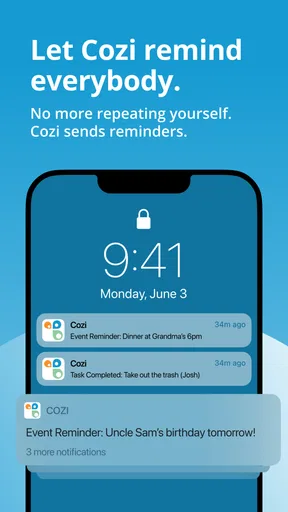
Communication is key, right? Cozi has got you covered there too. You can send family members reminders and updates directly through the app. It’s a simple way to keep everyone in the loop without having to send a million texts. Plus, there's a journal feature where you can jot down memories or notes. It’s a nice little touch that adds a personal element to the app.
Connectivity also shapes the less obvious parts of the experience: signing in, checking a current plan, and making sure changes are reflected for the people who share it. I would avoid building a routine around a critical last-minute update when I’m unsure whether a phone has a connection. Before a long drive or a crowded event, I’d check the details while I have a reliable connection and use direct communication for urgent changes. That is a sensible precaution for any shared digital organizer, not a claim that the app works in a particular way without internet.
Limits, alternatives, and who will enjoy it
I see Cozi as a strong fit for households that want a straightforward shared calendar plus practical lists, especially when different people need to coordinate recurring responsibilities. It can also help a couple, roommates, or a caregiver and relatives keep errands and appointments in one place, provided everyone is comfortable using the same account-based family routine. If your household already has a calendar everyone checks consistently, moving the same appointments into another app may create extra work rather than solve a problem.
Compared with a standard phone calendar, Cozi’s family focus is the difference: lists and meal planning sit alongside scheduling, so a household can connect an event to the shopping or chores around it. A generic task manager may offer a better fit for someone who wants deep project organization, complex task dependencies, or a highly customized workflow. Likewise, if you only need a private calendar for yourself, the shared-family structure may feel like more than you need. I would choose the simplest tool that the people involved will actually open.
There is a learning curve in deciding what belongs where. A calendar is best for commitments tied to a date or time; a list works better for flexible jobs and items to buy. Mixing every small task into appointments can clutter the week, while putting a fixed pickup time on a general to-do list makes it easier to overlook. A short household agreement about these boundaries is a low-effort way to make the app clearer, especially for family members who prefer not to explore menus or guess where information was added.
Keeping the routine manageable
For a data-conscious approach, I’d put only the details the household needs to coordinate in a shared space. A useful event title and the relevant time may be enough; private notes that do not help anyone act on the plan can stay elsewhere. I’d also take a moment during setup to understand who is included in the family group and what each person needs to see. That keeps sharing purposeful instead of turning a convenient organizer into a catch-all for personal information.
If something seems out of date, I would first check that I’m looking at the right shared calendar or list, then refresh my understanding with the person who made the change. When a connection is unreliable, avoid repeatedly editing the same item from different devices until you know which version is current; confirm the plan directly, then tidy the shared entry once everyone agrees. That small recovery habit can prevent duplicate groceries or confusion about who is doing a pickup.
Before inviting the whole household, I’d start with one week of real commitments and one active shopping list. That gives everyone a chance to see whether the calendar colors, reminders, and list habits make sense without asking the family to reorganize everything at once. After the first week, remove stale entries and settle on a consistent way to add new ones. The app is most useful when it reflects current plans, not when it becomes an archive of forgotten intentions.
What to expect before installing
Cozi Family Organizer is a free productivity app from Cozi Inc. Its average rating is 4.8 from around 113,000 ratings, and it has been installed over five million times. It is rated for everyone and runs on Android 6.0 or later; the current version is 2026.02.06. Those details make it accessible to many Android households, though a family should still check that each person’s device and preferred platform suit the way they plan to use a shared organizer.
The app is free to download, with in-app purchases ranging from $0.99 to $79.99 per item. I would begin with the free experience and decide whether it covers the household’s actual routine before considering any purchase. That is especially sensible if you are testing whether everyone will keep using a shared calendar and lists; no paid option can make a family adopt a tool that does not fit its habits.
At around 28,000 written reviews, Cozi has clearly attracted substantial interest, but popularity alone is not a reason to install it. The real test is whether it reduces the small coordination questions your household repeats every day. I’d judge it after a normal week that includes an appointment, a grocery run, and at least one shared task, rather than after setup alone.
Final Thoughts
In a nutshell, the Cozi Family Organizer is a powerhouse when it comes to keeping your life organized. Whether you’re managing a busy family schedule or just trying to keep your own life straight, this app is a fantastic tool. It’s user-friendly, packed with features, and honestly, it’s fun to use. If you’re ready to take control of your chaos, give Cozi a try. It might just be the best decision you make this week.
My final verdict is that Cozi works best as a shared household hub, not as a replacement for urgent conversation or a specialist planning system. Its calendar, lists, meal planning, reminders, and journal give family members several practical reasons to return, while the shared routine asks everyone to keep information current. If your family wants a simple place to coordinate ordinary life and is willing to check it regularly, I’d recommend trying it. If you need a solo calendar, elaborate project tools, or dependable coordination when devices cannot connect, a different approach may suit you better.
Pros
- Easy-to-use interface for all ages.
- Syncs across multiple devices seamlessly.
- Shared calendar for family events.
- Customizable shopping lists and to-dos.
- Notifications keep everyone updated.
Cons
- Limited features in free version.
- Ads can be intrusive at times.
- No offline access to data.
- Lacks integration with some calendars.
- Limited customization for themes.
FAQs for Cozi Family Organizer
What is Cozi Family Organizer, and how can it benefit my family?
Cozi Family Organizer is a comprehensive app designed to streamline and simplify family management. It offers features like a shared calendar, to-do lists, meal planning, and shopping lists. The app helps keep all family members on the same page, ensuring everyone is aware of schedules and responsibilities, ultimately saving time and reducing stress.
Is Cozi Family Organizer compatible with both Android and iOS devices?
Yes, Cozi Family Organizer is available for both Android and iOS devices. This cross-platform compatibility ensures that all family members can access and update their schedules and lists from any smartphone or tablet, making it easy to stay organized no matter what devices your family uses.
Does Cozi Family Organizer offer any free features, or is it entirely subscription-based?
Cozi Family Organizer offers a free version with basic features such as the shared calendar, to-do lists, and shopping lists. However, for enhanced features like an ad-free experience, birthday tracker, and premium themes, users may opt for Cozi Gold, a paid subscription service that offers additional functionality.
How secure is the information stored in Cozi Family Organizer?
Cozi Family Organizer prioritizes user privacy and data security. Information stored in the app is protected with industry-standard encryption methods. Users can rest assured that their personal and family data, such as schedules and lists, are kept secure from unauthorized access.
Can multiple family members edit and update information in Cozi Family Organizer?
Yes, one of Cozi Family Organizer's key features is its collaborative nature. Multiple family members can access the app simultaneously to edit and update information. This ensures that all changes, whether it's adding a new event or updating a grocery list, are instantly shared with everyone in the family.


